

TL;DR: When we hear the word “agent”, the things that come to mind are Codex, Claude Code, Cursor, or any terminal or code-based tools. But things have been changing since the introduction of computer-using agents that work directly on our local machine, navigating screens, opening apps, and completing tasks without us moving a finger. In this blog, we discuss the use case of computer-using agents and how sandboxes make them secure. We will also cover best practices for defining environments for sandbox agents for your product needs.

Agents are no longer limited to a chat window or a terminal window. They can now browse the internet, scan your entire workspace and computer, create a playlist, and much more. I am a guitarist, and I always chase tones. One area where agents help me create good tones is in editing bass tones.
Check out the video below where I connected my Line6 guitar processor [that emulates an amp] to my MacBook Air and asked Codex to create a good tone before my next gig. The guitar processor has an App that can be used to create and edit tones. Codex went through the entire library of amps and effects in the App and created a workable tone that I can edit later.
This shows how far we have come in building AI and how it has penetrated our daily lives. From an evolutionary perspective, I see that agents have also broken the barrier of an isolated environment and have reached a cooperative environment where they can interact with multiple components and create a workflow to get the desired result. This is possible because of a computer-using agent, or CUA.
A computer-using agent is an AI agent that interacts with your local computer using interfaces. What I mean is that it works essentially as a human would on a laptop or computer screen: it can click, navigate apps, write text, open a window, close a window, and everything in between. All done autonomously.
It is important not to confuse CUA with API tool calling. API tool calling uses predefined functions that you write as a schema, and the agent invokes them.
CUA, on the other hand, functions as a general agent in a general environment, interacting with multiple apps to get a possible outcome.
But CUA has its own issues:
Exposing personal information and credentials.
Cooperative secrets.
Network access and many more.
All these create an engineering as well as a product problem. Essentially, how to make the CUA powerful without allowing it to touch anything that is important or that is secretive, like bank account numbers, company secrets, and so forth. In other words, do not give overall access to the CUA agent, but also ensure that it has enough access to make productive and meaningful decisions.
To fix this issue, you need a sandbox.
A sandbox creates an isolated environment where only allowed apps are used by the agent, and other information is kept away from it. In a nutshell, a computer using an agent creates an execution environment, and a sandbox isolates that environment with proper constraints, rules, structure, permissions, and access.
Now we are in an agentic era where these sandboxes are being shipped to users across various workflows and domains. These are done using a Sandbox API such as OpenAI “Sandbox Agents.” Anyone who wants to get rid of manual, tedious work, like creating a report on a researched topic, filtering emails for a certain keyword, and extracting all the information to create a report, etc., can do so using these agents. As such, these agents are now becoming part of the AI stack.
Computer Is All It Needs
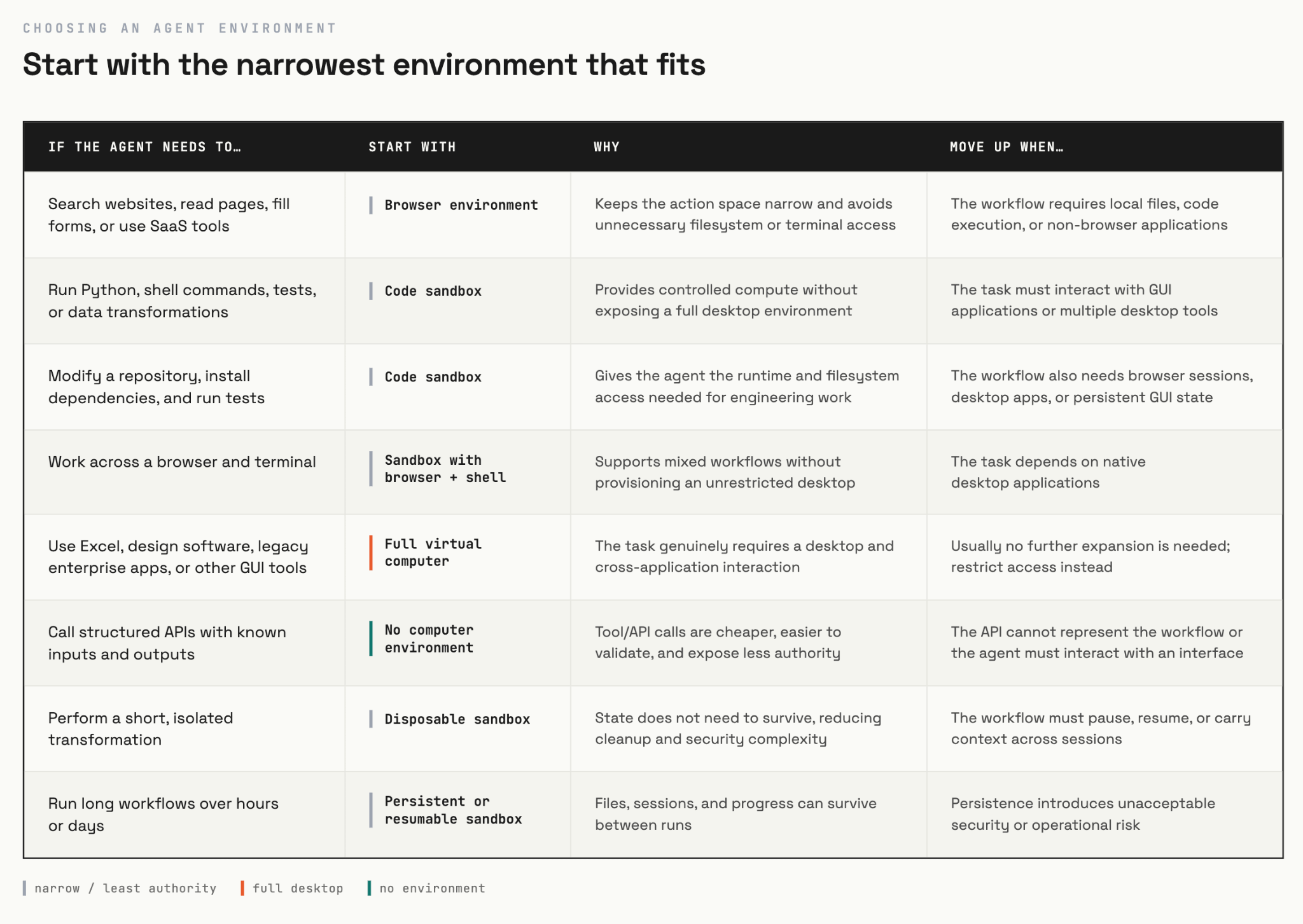
A computer-using agent needs a working computer because it is its working environment. And within a computer, it can have multiple types of working environments. There could be a browser environment where it uses the web for research. It can also have a SaaS workflow, CRM, forms, and many other things. Likewise, it can also have a code sandbox for code execution, running shell scripts, data extraction and processing, etc.
Lastly, it can also use a full computer, which can bring multiple workflows together. For instance, it can use a browser workflow, a coding-based workflow, and also access multiple applications like Linear and Notion to execute a sequence of tasks in the given workflow.
The broader the workflow in a given environment, the more chances there are for the agent to lose track of the task. In other words, there are chances of hallucination and token burnout.
OSWorld 2.0 data shows that Claude Opus 4.7 took around 318 tool calls to complete the task. Researchers observe the same issues as mentioned earlier, such as:
Losing track of the core idea.
Hidden state.
New information appearing in the middle of the workflow.
Lack of verification and hallucination.
But that doesn’t mean a broader environment is bad for the agent. The more general or broader the environment, the more the agent can find better solutions. But the agent needs to be well-trained through instructions (something we will explore later).
Essentially, keeping the entire workflow simple will help the agent to complete the task and provide more value in the output. To do that, keep your environment simple, because a simple workflow can reduce permission state complexity, latency, and debugging complexity.
Sandbox Also Provides Secure Autonomy
So far, we have discussed that the sandbox isolates the environment to protect and provide security so your sensitive information doesn’t leak out. But that statement is not entirely complete. You’ll also work in areas where you need a lot of permissions. This can lead to something known as approval fatigue, where a user approves everything mechanically and doesn’t read the message behind the approval request.
Why does the agent need approval? What is the reason behind the agent accessing that information?
Imagine the agent is operating directly on your employee’s computer, or maybe your friend’s computer. Then it may have to access personal files, SSH keys, and other credentials and secret and sensitive information. Because every action has consequences, the agent may need to ask for permission repeatedly. To save time, we might not read the message behind the permission and just allow everything, which can be scary and is also not good practice.
To tackle this issue, Anthropic introduced a couple of things: filesystem and network isolation for Claude Code. The idea behind these two features is that Claude can now perform actions without needing to ask permission every now and then.
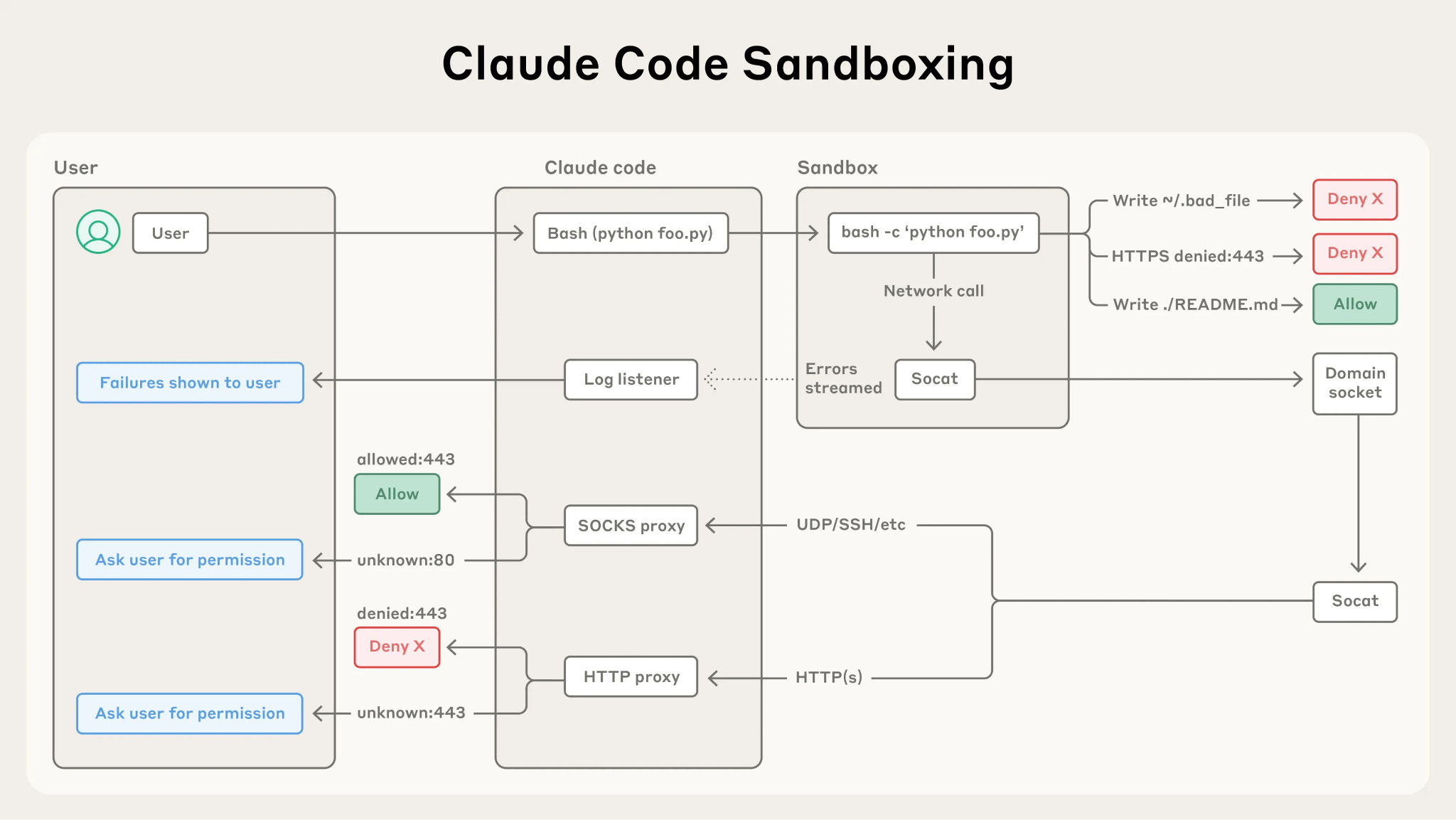
This means that when guardrails, permissions, and boundaries are defined properly, the agent will perform substantially better with less supervision, even in a broader environment.
In a parallel universe, OpenAI Codex follows a similar approach. Here, the sandbox [as they define it] is a contained system to execute a given task with proper structure and well-defined boundaries. Whereas approval [policy] determines when the agent must stop and ask for approval.
Now, I want you to bring these features into your product. Meaning, you must find out which tasks need to be under the following buckets:
Allowed automatically: This can be reading files, repos, and folders.
Requires approval: Creating a branch, sending external messages/emails, etc.
Never allowed: Deleting a file.
Once the requirements for autonomous action are defined, we need to define the agent execution env.
Defining Agent Execution Environment
In the previous sections, we saw how the sandbox provides security and an environment for the agent to work autonomously without unnecessary approvals. Of course, the latter needs to be defined precisely. Now, in this section, we will see how to define the execution environment.
An execution environment is roughly defined as the computing context where the agent takes an action. So, before starting, always ask the question “What execution env does this workflow require?”
You can define the following based on your requirements:
Available app or software,
Files and directories,
Network access,
Compute resources, etc.
If you study the OpenAI blog, you will see that they mention the MANIFEST.environment file, where you define what files, directories, and other content that the agent should have access to.
Here is a simple example:
manifest:

  entries:

    account_brief.md:

      type: file

      content: “...”

    implementation_risks.md:

      type: file

      content: “...”
You will see that the industry is moving towards “defining and declarative” ways to configure the environment where the agent can take actions.
Here is the checklist that you can use to prepare the environment for your agent:
Understand the capabilities: Does your agent need a browser, terminal package installation, or GUI? A GUI can be any app that the agent can navigate and click on to.
Access: Which files, folders, APIs, MCP servers, etc., can the agent have access to?
Credentials: Will you give credentials for a certain website? Or will you just open the website, login with your credentials, and ask the agent to only focus on a certain page to get the information?
State of env: Is the environment reusable, persistent, or disposable?
Resource usage: How much GPU, memory, runtime, and storage can one run consume?
Control: Which of the actions in the environment require approval, and which do not? Also, in the case of failure, what are the next steps?
Closing Thoughts On The Usefulness Of Autonomy
With agents, autonomy will play a significant role in our professional lives and even in our daily lives. What we choose to automate is entirely on our convictions. Many things and tasks can be automated. Especially because every workflow is digital and lives on our computers.
Products that amplify autonomy will eventually become a core focus in the industry. With AI, automation is much more precise and intelligence-driven. Products like computer-using agents enable us to amplify our usefulness in tasks that require a lot of thought and decision-making.
But it is also important to point out that even though I explained the security aspect of a computer-using agent via a sandbox, it is still secure. A recent benchmark showed that agents can be attacked using multi-step indirect prompt injection. This is where malicious instructions are essentially distributed across the web pages. So, at the individual level, these prompts may not be harmful, but when the entire prompt is extracted from various sources into a single [isolated] environment, it becomes a lethal weapon.
According to this paper, the success of multi-step indirect prompt injection rose from 31.3% to 36.9% in just three steps. One recent event was the OpenAI-Hugging Face cyberattack. According to the report, models in an isolated system exploited previously unknown vulnerabilities in Hugging Face’s infrastructure.
Incidents like these make us worry about the future of AI agents, but one thing is certain: with each passing day, research on autonomy is getting better and better. It is always important that we create constraints and boundaries so that the agent does not overstep. Everything has to be well written, and everything has to be well maintained so that the guardrails and evals are in the proper place. The agent does not invoke any unnecessary tool calls or extract any credentials from files that it is not supposed to touch.
That said, computer use is definitely one of the key products that will revolutionize how products are built and how it impacts the current workflow.