

TLDR: MCP made it easy to connect your agent to dozens of systems. What it did not change is how your model performs when it has to reason across all of them at once. A May 2026 benchmark showed performance drops of up to 85% as tool count grows, and the gap between models opens specifically on chained, multi-tool calls, not single-turn ones. The model you chose for three tools is probably the wrong choice for thirty. This article explains the degradation pattern, where the current model generation lands, and a three-question framework to get this right before you debug drift in production.

By Q1 2026, there were 17,468 MCP servers in public registries and 97 million monthly SDK downloads. The difficult part of connecting agents to external systems is, for the most part, solved. You can give your agent access to your calendar, code repository, CRM, documentation, and Slack workspace in an afternoon.
What the protocol does not solve is what happens inside the model when it has to use all of those connections at once.
This is the question I keep coming back to, and I think most product builders are not asking it early enough.
What the MCP Moment Changed, and What It Did Not
MCP standardized the interface between agents and external tools. Before it existed, each new integration required custom work. After MCP, the tool count grows by configuration, not engineering. Adding a new tool costs almost nothing.
The problem is that model capability did not scale in parallel with tool availability. The benchmarks most teams rely on were designed with fixed, small tool sets. They did not anticipate that production agents would routinely operate across 20, 50, or 300 tools in a single session. What MCP actually standardized at the protocol level solved the connectivity problem. However, it left the problem of reasoning unsolved, and that is the issue this article is about.
What Building an Agent With Pi Taught Me About Cognitive Load
I have been building Pi, a personal agent for managing research workflows, drafting, code linting, running coaching, and calendar coordination. When I started, Pi connected to three tools. I used a small, fast model locally to keep costs low. It worked well, and I thought I had made a smart tradeoff.
When it comes to my system, I use a 32GB unified memory with a 512GB MacBook Air. These days, I am generally leaning towards the Gemma 4 small model, as it works well on edge devices and laptops.
Anyways, when I added six more tools and connected them to Notion, a couple of APIs, and my calendar. The model did not throw errors. What happened instead was that Pi started to drift.
The first tool call would be right. The second would interpret the response slightly off. By the third step in a chain, Pi was doing something adjacent to what I had asked, not wrong enough to catch immediately, but wrong enough to waste thirty minutes when I finally noticed. The model does not break. It gradually loses the thread.
George Hotz described this in a February 2026 stream: “Using agents requires the exact same sort of focus as traditional programming.”
Models doing agentic work face the same cognitive challenge as a programmer working across a large, interconnected system: holding state, tracking intent, and revising mid-execution. Models have a ceiling on how much of this they can do reliably.
Small models hit that ceiling fast. When I compare a small model (Gemma 4) versus Claude Opus 4.7 inside Pi, the gap shows up in three places:
Multi-step tool chaining. Small models handle isolated calls adequately. Degradation is sharp when the output from one tool becomes the conditioning input for the next. The model loses coherence across the call graph. The reason is not that it cannot read schemas, but that it cannot keep track of where it is in a multi-step chain while doing so.
Mid-task strategy revision. Opus 4.7 pairs a fast executor with a high-intelligence advisor that checks whether the plan still holds mid-task and revises if it does not. Small models do not do this. They continue on the original plan even when intermediate results have already invalidated it.
Cross-system coherence. When a task spans the calendar, Notion, Slack, and a code repository, the model must maintain context for all four concurrently. In small models, this context compresses. Details from the first tool response have faded by the time the fourth call is planned.
Cormac Brick and the Google team showed Gemma 4 27B fine-tuned from 46% to 90% on-device task completion via LiteRT-LM. That works because the scope is deliberately narrow: specific domain, specific tools, predictable inputs. When the scope is narrow, small models are the right choice. The problems start to compound the moment the scope is not.
The Data: Performance Drops Are Not Gradual
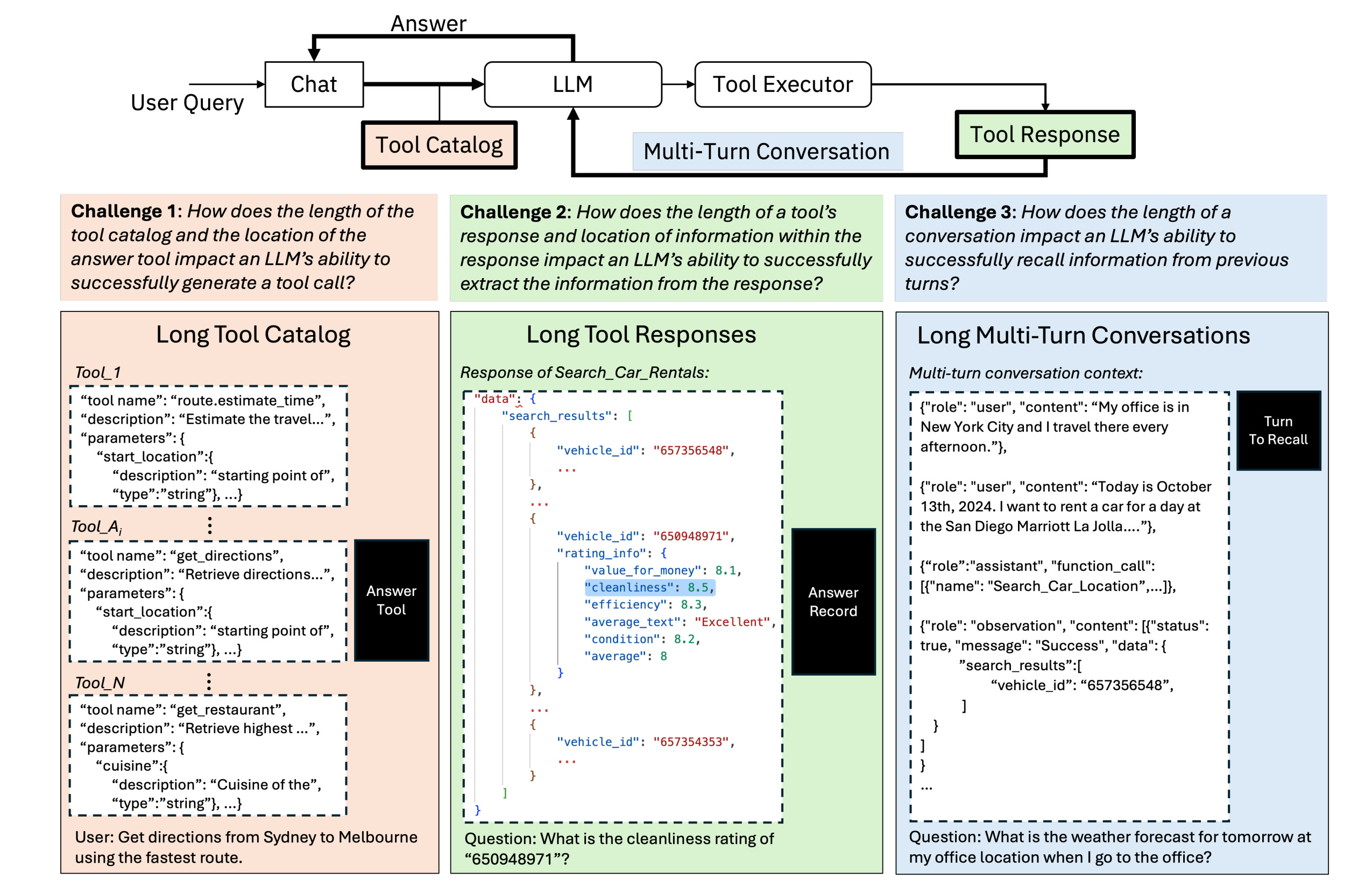
LongFuncEval quantifies exactly what I have been observing:
Tool count: Performance drops 7 to 85% as available tools increase.
Tool response length: Performance drops 7 to 91% as tool responses grow longer.
Conversation length: Performance drops 13 to 40% as multi-turn interactions extend.
The Berkeley Function Calling Leaderboard V4 found that open-source and proprietary models perform equally well when an agent makes one tool call at a time. The differences show up when those calls need to happen in sequence or simultaneously.
If you (or your team) test the one-at-a-time case, it means they never catch the problem that actually surfaces in production.
The drops also behave like threshold effects. Agents perform reasonably until they cross a complexity ceiling, after which they degrade sharply. What looks stable at ten tools can collapse at twenty, and the tool calling failure patterns under load follow a consistent sequence: coherence breaks first, then accuracy, then task completion.
Where the May 2026 Model Generation Lands
The models are worth understanding and are split into two groups.
Closed models:
Claude Opus 4.7. The advisor tool pattern, updated in May 2026, includes dreaming, outcomes tracking, and multi-agent orchestration. SWE-bench Pro: 64.3%. Best for high-connectivity agents where cross-system coherence is the core requirement.
Gemini Flash 3.5. Google’s fast, cost-efficient model is built for speed and throughput. Well-suited for agents with moderate connectivity needs where inference cost matters and deep multi-step reasoning is not the primary constraint.
GPT-5.5 Instant. OpenAI’s fast-response model is positioned for lower-latency workloads. A practical choice for mid-range Connection Load scenarios where a swarm or advisor architecture is not yet justified.
Open-source models:
Kimi K2.6. Swarm architecture across 300 sub-agents. SWE-bench Pro: 58.6%. The swarm distributes cognitive load across specialized agents rather than asking one model to hold everything. This is what makes it competitive with closed models at high tool count.
GLM-5.1 (MIT license). Strategy revision is a first-class capability, not an afterthought. SWE-bench Pro: 58.4%. Best for agents that need to replan mid-execution without the overhead of a full swarm.
Gemma 4 27B. Fine-tunable to 90% task completion at narrow scope via LiteRT-LM. Right for single-domain agents with controlled tool sets. Not the right choice for high-connectivity, general-purpose agents.
The Connection Load Framework
This is what I wish I had had before I started building Pi.
Before you choose a model, answer three questions:
Question 1: How many tools does your agent have access to at session start?
Under 10 tools: A small, fast model is a viable choice.
10 to 30 tools: You need a model that handles chained calls reliably.
Over 30 tools: Swarm architecture or an Opus-class model is the baseline, not the upgrade.
Question 2: How often does a single user request span three or more external systems?
Rarely: Most capable models will work adequately.
Regularly: You need a mid-task strategy revision built into the model architecture.
Routinely: The advisor pattern or swarm architecture is not optional.
Question 3: Is your agent’s scope intentionally narrow?
Yes: Fine-tune a small model. Performance at a narrow scope is largely a training problem, not a model-size problem.
No: Do not fine-tune a small model on breadth. Choose your architecture first, then your model.
Connection Load is the product of these three factors: tool count, cross-system frequency, and scope breadth. The higher the product, the more model selection matters relative to everything else you are optimizing.
Before You Build
Two scenarios, and what each one calls for:
Scenario A (High Connection Load). Your agent connects to CRM, calendar, a code repository, documentation, and Slack. This is an Opus 4.7 or Kimi K2.6 situation from day one. The debugging cost when the small model drifts at step four of a six-step chain will exceed any savings on inference.
Scenario B (Low Connection Load). Your agent has five tools and predictable inputs within a single domain. Fine-tune Gemma 4 27B. You will likely reach 90% task completion at a fraction of the inference cost.
The full architecture checklist for production-ready agents covers this decision in the context of the broader system design, beyond just the model layer.
Closing
The question worth asking is not “which model is best?” That question has no useful answer without knowing the Connection Load first. The real question is: what is your agent actually doing when it talks to everything MCP just connected it to?
Answer that clearly, and model selection becomes something you can reason through rather than guess at. The builders who get this right are not the ones who memorized the latest benchmark tables. They are the ones who understood that those benchmarks were designed before agents started talking to thirty systems at once.