

TLDR: Traditional RAG systems retrieve blindly for every query. This wastes tokens and slows responses.
Agentic RAG adds intelligence. It classifies intent first, then decides whether to retrieve, call tools, or answer directly. This reduces costs by 40% and latency by 35%.
The blog covers three core patterns: query routing through intent classification, tool orchestration with error handling, and cost tracking with continuous evaluation.
Build systems that decide, adapt, and optimize. That’s production-ready agentic RAG.

RAG systems are among the most widely used and efficient systems for building AI-powered apps and products. The advantage of such a system is that you can retrieve information from a database based on a query and then use that information to generate accurate responses from the LLM. This approach:
Provides accurate responses.
Reduces hallucination.
Injects domain-specific data. Essentially, it involves narrowing down the knowledge of LLM while keeping the generalization capabilities of the LLM.
However, a RAG system, whether traditional or otherwise, has certain drawbacks. One of which is that they work in a single flow. They follow a simple pattern: embed a query, retrieve context, and generate a response. But production systems need more. They need to decide when to retrieve, coordinate multiple tools, handle failures gracefully, and provide complete observability.
This is where agentic RAG comes in. Instead of a rigid pipeline, agentic systems intelligently route queries, orchestrate tools, and adapt their approach based on context.
The context here means “what the user demands or is looking for?”
This article explores the essential architecture patterns for building production agentic RAG systems.
Core Architecture Overview
Before we start, let’s understand the core architecture of the Agentic RAG system. Unlike traditional RAG’s linear pipeline, agentic RAG introduces a decision-making layer that coordinates multiple operations.
The architecture consists of three main layers:
Orchestration Layer: This is the CPU or the brain of the system. This layer classifies user intent, decides whether to use RAG retrieval, tool execution, or both, and coordinates the overall workflow. It’s responsible for intelligent routing based on query patterns.
Execution Layer: Where the actual work happens. This includes the RAG pipeline (embedding, retrieval, context assembly), tool executions (weather APIs, calculators, database queries), and the LLM inference that synthesizes everything into a final response.
Infrastructure Layer: The foundation that makes production possible. The infrastructure layer provides a platform for adding models, vector databases for retrieval, deployment management for configuration control, and an observability layer to monitor every layer.
The key difference? Traditional RAG always retrieves. Agentic RAG decides whether retrieval is needed, then orchestrates the optimal combination of retrieval, tools, and generation to efficiently answer the query.
The image below shows the complete execution trace of an Agentic-RAG in production.
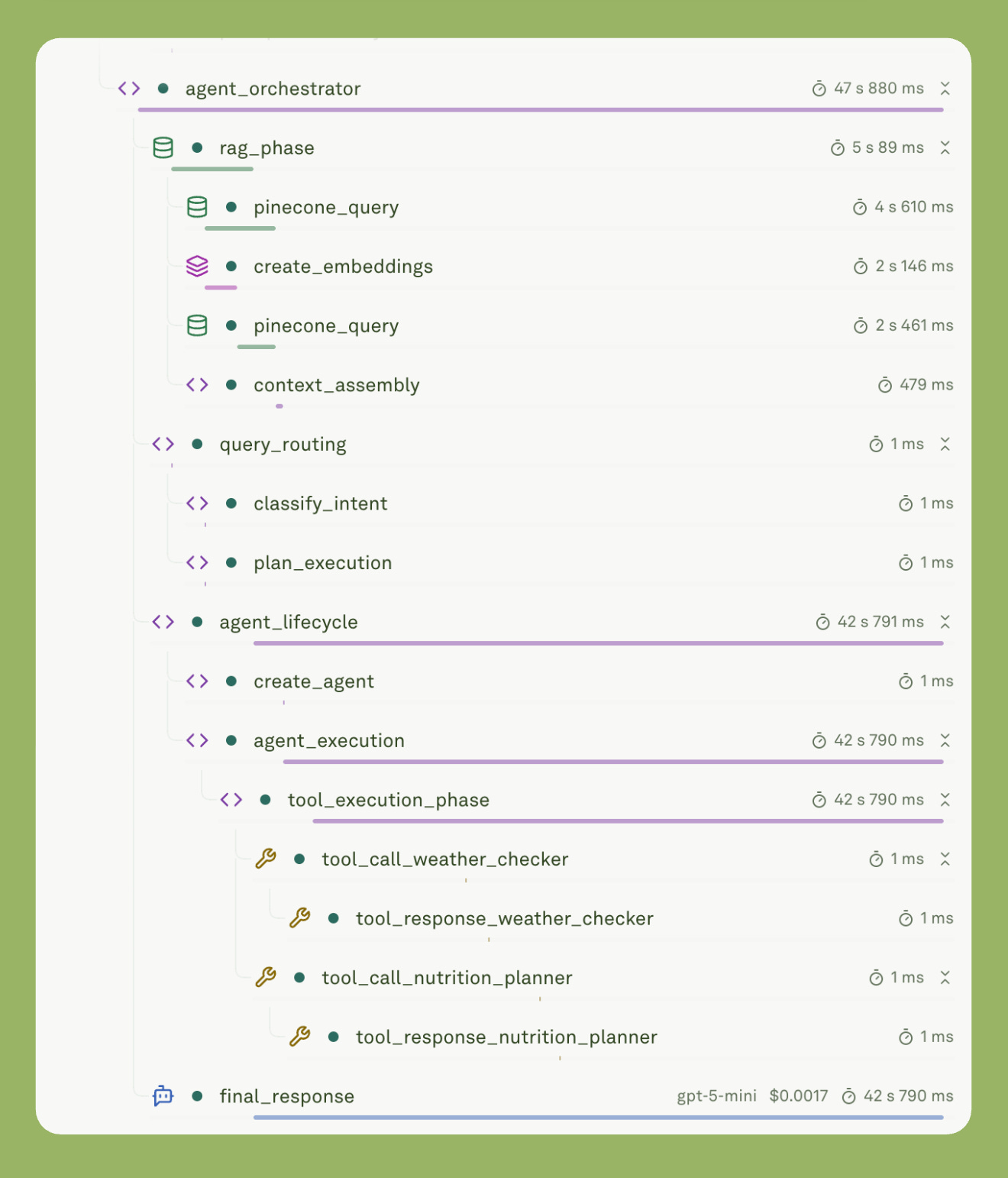
You will notice how each span or component gets logged with timing/latency and cost.
Building a Unified Gateway Layer
When you build an AI product, you have to juggle across multiple providers. Especially when you are building a context-heavy app, you have to be careful of the token consumption, cost per token, and latency of the response. Now, when you choose models from OpenAI, they are less expensive, but they tend to be slow, and as the context increases with RAGs and tool calls, they tend to get slower. Claude models are fast, and hand tools can be called quite efficiently. But the downside is that they are expensive.
Weighing different options is essential. The same is true for the vector database provider, the embedding model provider, and the API used.
Everything matters.
For that you need an abstraction layer. A gateway that lets you switch providers without restructuring code. This pattern is critical for production systems where you need:
Failover capability: When one provider goes down, route to another.
A/B testing: Split traffic between models to evaluate performance.
Cost optimization: Route queries to the most cost-effective model for each task.
Provider flexibility: Avoid vendor lock-in. This is the most crucial aspect. Vendor lock-in can waste a lot of time.
Implementing the Gateway Pattern
I built my gateway layer using Adaline Gateway, which provides a unified interface across OpenAI, Anthropic, Google, Bedrock, and other providers.
Below is the simple schema in TypeScript.
import { Gateway } from ‘@adaline/gateway’;
import { OpenAI } from ‘@adaline/openai’;

const gateway = new Gateway();
const openai = new OpenAI();
const model = openai.chatModel({
  modelName: ‘gpt-4’,
  apiKey: process.env.OPENAI_API_KEY
});

const response = await gateway.completeChat({
  model,
  config: { temperature: 0.7, max_tokens: 4096 },
  messages: [
    { role: ‘system’, content: [{ modality: ‘text’, value: systemPrompt }] },
    { role: ‘user’, content: [{ modality: ‘text’, value: userQuery }] }
  ],
  tools: deployedTools
});
What is the essential feature of this abstraction? It lets you switch from the GPT model to the Claude model with a single line code. When OpenAI had its outage last month, my system automatically routed traffic to Anthropic without any code changes.
Also, there are times when OpenAI models tend to take a longer time to generate a response. The best practice is to ensure you are ready with at least 2-3 models. These models should be ready for deployment. Meaning, that you should test the models on all the necessary evals and user queries. If one model fails, you should quickly switch to the next best option.
This approach gives you:
One-line provider switching.
A/B testing without code changes.
Automatic fallback chains.
Consistent tool definitions.
Unified response parsing.
Now, if you’re using a prompt management system, you can directly fetch deployed configurations:
const deployed = await fetchDeployedPrompt(promptId, ‘latest’);
const { model, settings, tools } = deployed.prompt.config;
The prompt or the payload will already contain the system message, user message template, variables, tools, and model configuration. Your job is simply to assemble them into the gateway request.
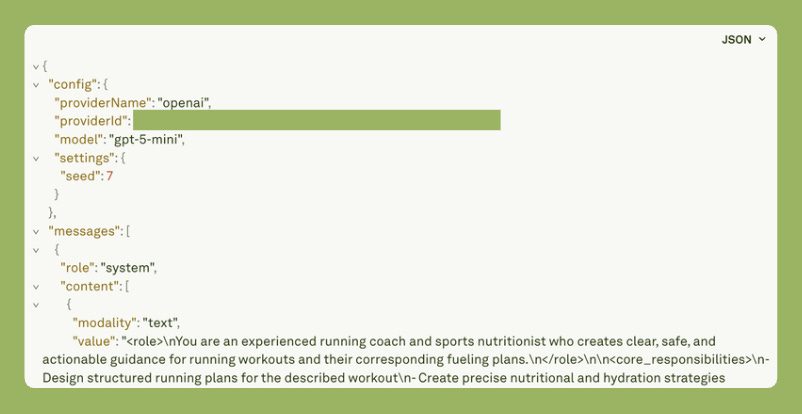
This abstraction is important, especially in production.
Monitoring Production RAG with Hierarchical Traces
Monitoring your app’s performance in production is important. You can actually figure out the plausible future failures or the component causing the problem or bottleneck.
Every operation in your system should create a structured span that you can trace. Here’s how I structure my traces:
const trace = createTrace(’Agentic-RAG’, projectId, promptId);

addSpan(trace, {
  name: ‘rag_phase’,
  status: ‘success’,
  startedAt: Date.now(),
  endedAt: Date.now() + 1200,
  content: {
    type: ‘Retrieval’,
    input: { query: userMessage, topK: 5 },
    output: { retrievedCount: 5, avgScore: 0.87 }
  },
  cost: 0.0002,
  tokens: { input: 234, output: 0, total: 234 }
});

await submitTrace(trace);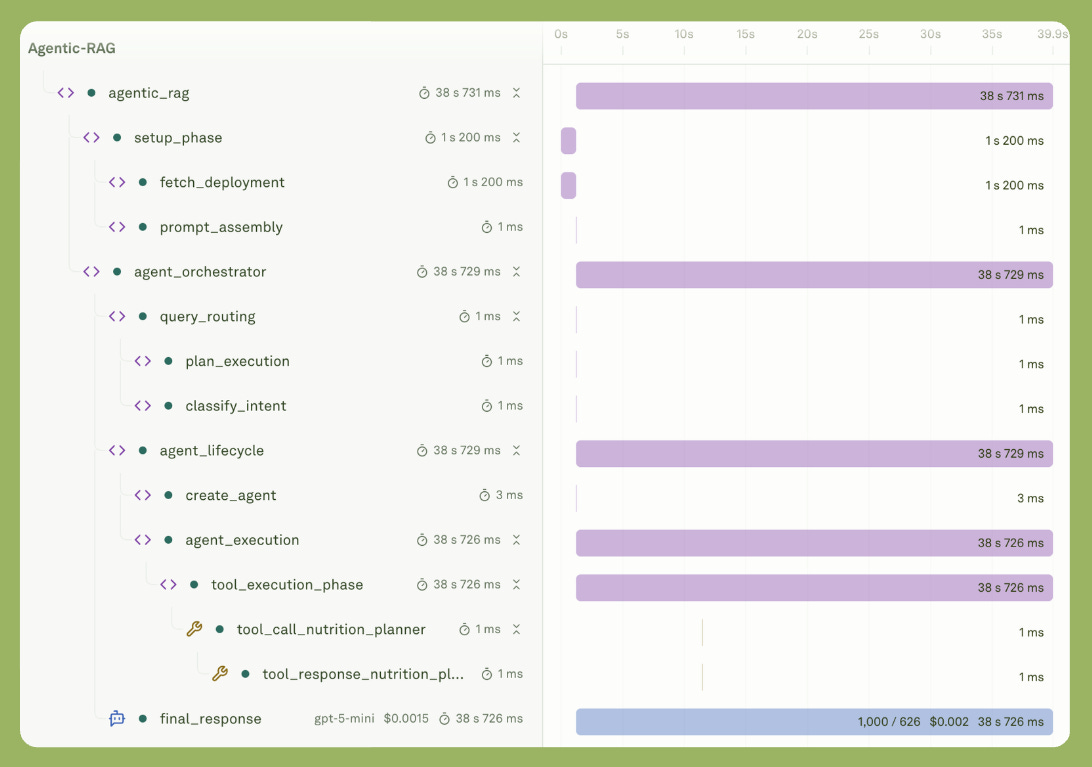
What you can see:
Visual timeline showing parallel vs sequential operations.
Cost breakdown: “Embeddings cost $0.0002, LLM cost $0.0228.”
Token analysis: “Input: 1,234 tokens, Output: 567 tokens.”
Error traces: Immediately see which span failed.
Performance insights: “RAG phase is your bottleneck at 1.2s.”
This visibility is what separates prototypes from production systems. For instance, when costs spiked 3x last Tuesday, I immediately saw that a new query pattern was triggering unnecessary RAG retrievals. Fixed it in 10 minutes.
Query Routing & Conditional RAG
What makes RAG agentic is its ability to route queries and use tools whenever required. This is important because we don’t want you to populate and pollute the content that is fed into the LLM. Unnecessary information can lead to context overload and context pollution. This essentially confuses the LLM and results in delayed responses, unnecessary use of tokens, a rise in token prices, and inefficacy in the generated response.
Efficiency Through Intelligence
Not every query needs retrieval. Consider these examples:
“What’s 2+2?” Direct answer, no retrieval.
“What’s the weather in Austin?” Use the weather tool.
“What does the training guide say about tempo runs?” RAG retrieval.
“Based on the guide and today’s weather, plan my run.” Both RAG and tools.
Let’s reiterate. Blindly retrieving for every query:
Wastes $0.00002 per embedding call (adds up at scale).
Adds 200-500ms latency for embedding + vector search.
Can inject irrelevant context that confuses the LLM.
Increases prompt size, raising inference costs.
The solution is to classify intent first, then route intelligently.
Intent Classification
Start with simple regex patterns, then evolve to ML-based classification:
function classifyIntent(userMessage: string): string {
  // Check for explicit retrieval keywords
  if (/guide|manual|documentation|says|according to/i.test(userMessage)) {
    return ‘rag_enabled’;
  }

  // Check for tool-specific patterns
  if (/weather|temperature|forecast|conditions/i.test(userMessage)) {
    return ‘weather_tool’;
  }

  if (/nutrition|hydration|fueling|calories/i.test(userMessage)) {
    return ‘nutrition_tool’;
  }

  // Default to direct generation
  return ‘direct_query’;
}

// Track decision for observability
const intent = classifyIntent(userMessage);
addSpan(trace, {
  name: ‘classify_intent’,
  content: {
    type: ‘Function’,
    input: { userMessage },
    output: { intent, ragRequired: intent === ‘rag_enabled’ }
  }
});
You don’t need a heavily coded intent classification function. Just ensure that the function does the job. The good thing about the LLM-based app is that you have to consider the natural language. Meaning, understand and anticipate as a product leader what keywords the users can use. Study the pattern and iterate over it.
Conditional RAG Execution
The app should only retrieve when the intent indicates it’s needed. Otherwise, don’t waste tokens. Sam Altman said that [and I am paraphrasing] “that token will be the future wealth.”
So, why waste tokens?
Let's be smart.
Below is simple TypeScript code that retrieves information using the OpenAI embedding model and the Pinecone Vector DB when needed. This RAG function only works if the intent is ‘rag_enable’:
let finalSystemMessage = systemMessage;

if (intent === ‘rag_enabled’) {
  const ragStart = Date.now();

  // Step 1: Create embedding
  const embedding = await gateway.getEmbeddings({
    model: embeddingModel,
    embeddingRequests: { modality: ‘text’, requests: [userMessage] }
  });

  // Step 2: Query vector store (Pinecone, Weaviate, etc.)
  const matches = await pineconeIndex.query({
    vector: embedding.response.embeddings[0].embedding,
    topK: 5,
    includeMetadata: true
  });

  // Step 3: Assemble context from matched chunks
  const snippets = await Promise.all(
    matches.matches.map(async (match) => {
      const { fileName, chunkNum } = parseMetadata(match);
      return await readChunkContent(fileName, chunkNum);
    })
  );

  const retrievalContext = snippets.join(’\n\n’);

  // Step 4: Augment system message with context
  finalSystemMessage = `${systemMessage}

[RETRIEVED_CONTEXT]
Use only the following retrieved information when relevant:
${retrievalContext}`;

  // Track complete RAG phase
  addSpan(trace, {
    name: ‘rag_phase’,
    startedAt: ragStart,
    endedAt: Date.now(),
    content: {
      type: ‘Retrieval’,
      input: { query: userMessage, topK: 5 },
      output: {
        matchesFound: matches.matches.length,
        contextLength: retrievalContext.length,
        avgSimilarityScore: calculateAvgScore(matches)
      }
    },
    cost: calculateEmbeddingCost(userMessage)
  });
}
One of the best practices is to add these components as spans and monitor them. This will allow you to monitor which user queries enabled RAG.
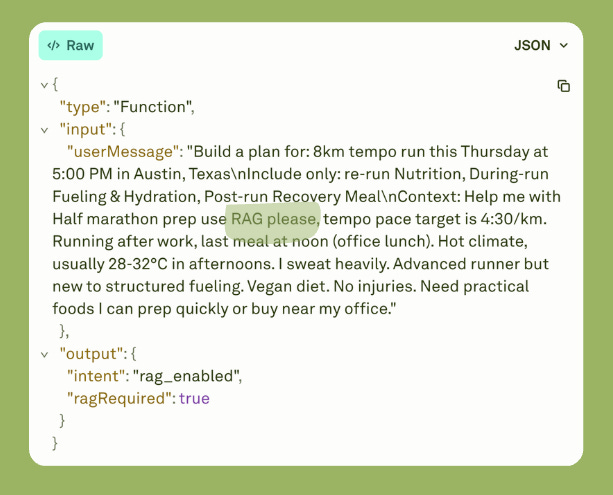
In the image above, you will see a simple term “use RAG please”, which invokes RAG. But you can set it to anything.
Tool Orchestration & Error Handling
I have already explained the importance of tool calling in the previous blogs. Check out the link below.

Letting LLMs use tools is essential because it lets you feed live information into them. Take, for example, the weather tool. As a runner, you need to know what the ideal running weather is. Not only that, but depending on the weather, you need to adjust your calorie intake and maintain a good hydration regimen.
There are many more functionalities that the tool can add. You essentially connect the API via a tool calls.
Here’s how I implement a weather tool with proper error handling:
const weatherTool = tool({
  name: ‘weather_checker’,
  parameters: z.object({
    location: z.string(),
    datetime: z.string()
  }),
  execute: async (args) => {
    addSpan(trace, {
      name: ‘tool_call_weather_checker’,
      content: { type: ‘Tool’, input: args }
    });

    try {
      const data = await fetchWeatherAPI(args.location);
      addSpan(trace, {
        name: ‘tool_response’,
        content: { output: data }
      });
      return data;
    } catch (error) {
      // Don’t fail - return fallback
      return { temperature: 20, note: ‘Using defaults’ };
    }
  }
});
I log both tool calls and responses as spans. This level of clarity lets me audit how well tools are performing. Here’s the tool definition interface I use:
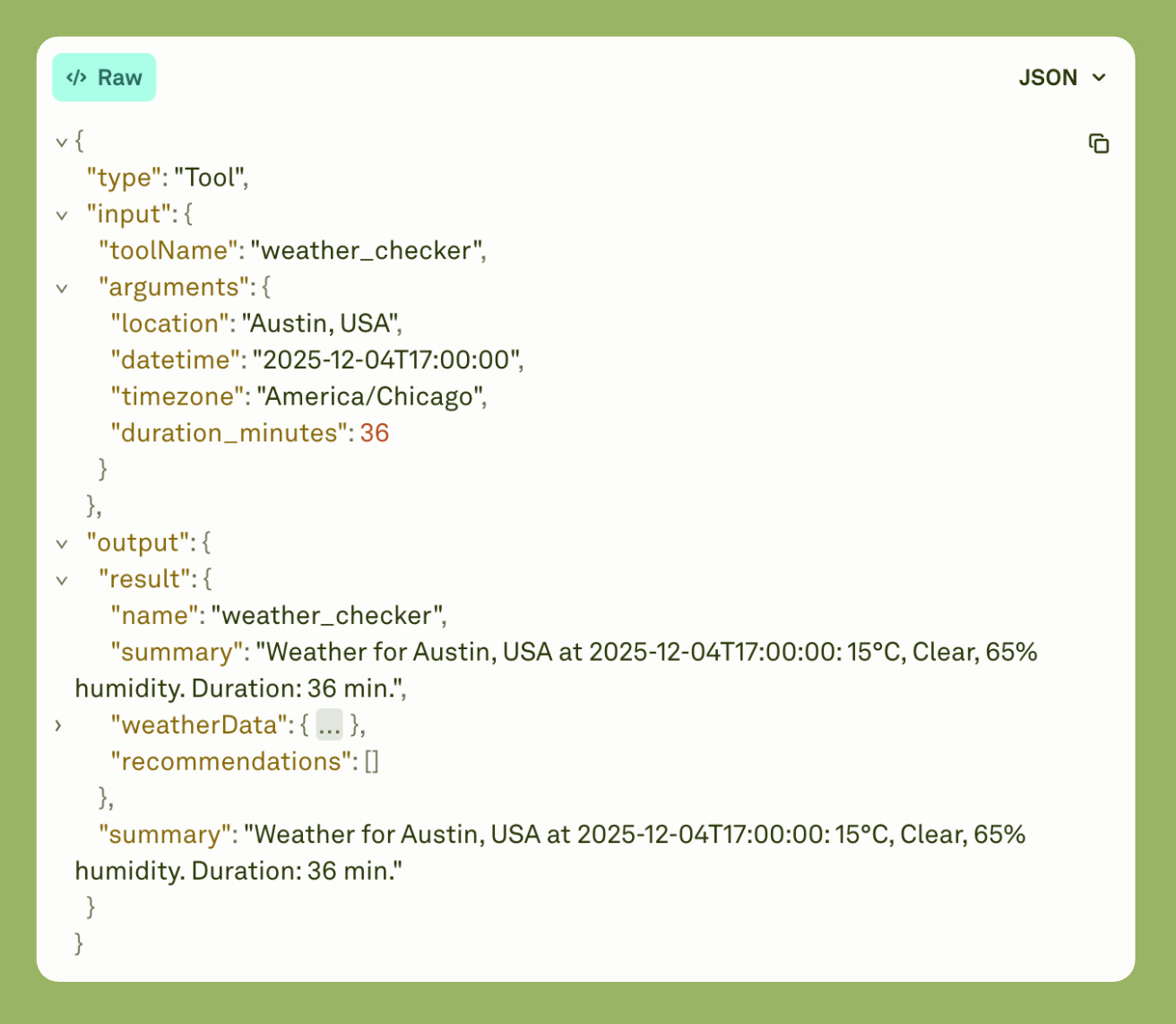
But what if the tool calling fails? In that case, you must write a function to handle failures. Proper error handling allows the app to continue running instead of throwing errors and stopping execution.
async function coordinateTools(calls: ToolCall[]): Promise<Results> {
  const results = await Promise.allSettled(
    calls.map(c => executeTool(c))
  );

  const successes = results.filter(r => r.status === ‘fulfilled’);
  const failures = results.filter(r => r.status === ‘rejected’);

  return { successes, failures };
}

// Synthesize with LLM
const final = await gateway.completeChat({
  model,
  messages: [
    { role: ‘system’, content: systemPrompt },
    { role: ‘user’, content: userQuery },
    { role: ‘assistant’, content: toolCalls },
    ...successes.map(s => ({ role: ‘tool’, content: s.data }))
  ]
});
Here’s a real example from production where RAG retrieval failed, but the system continued:
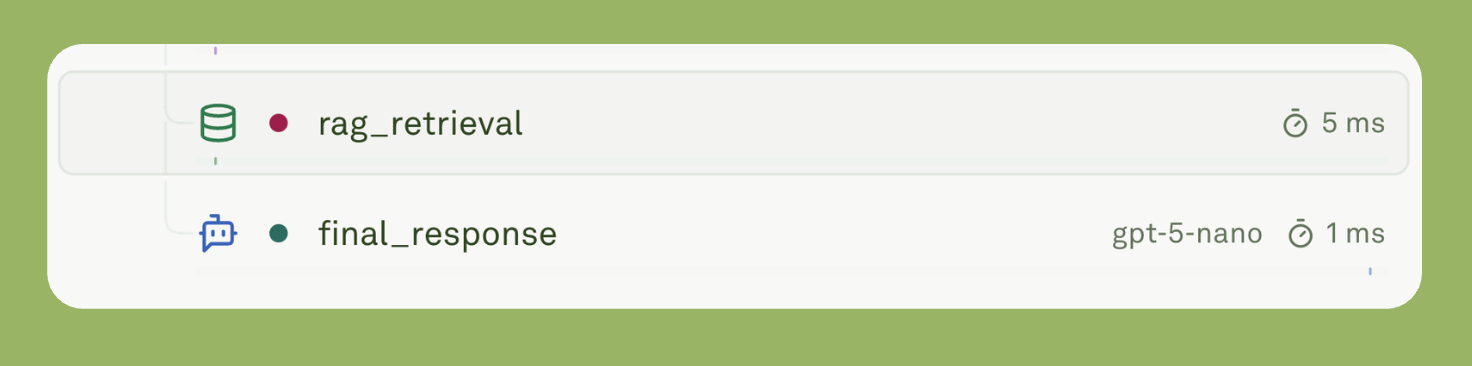
Despite an error during RAG execution, the LLM still generated the final response.
Cost & Performance Tracking
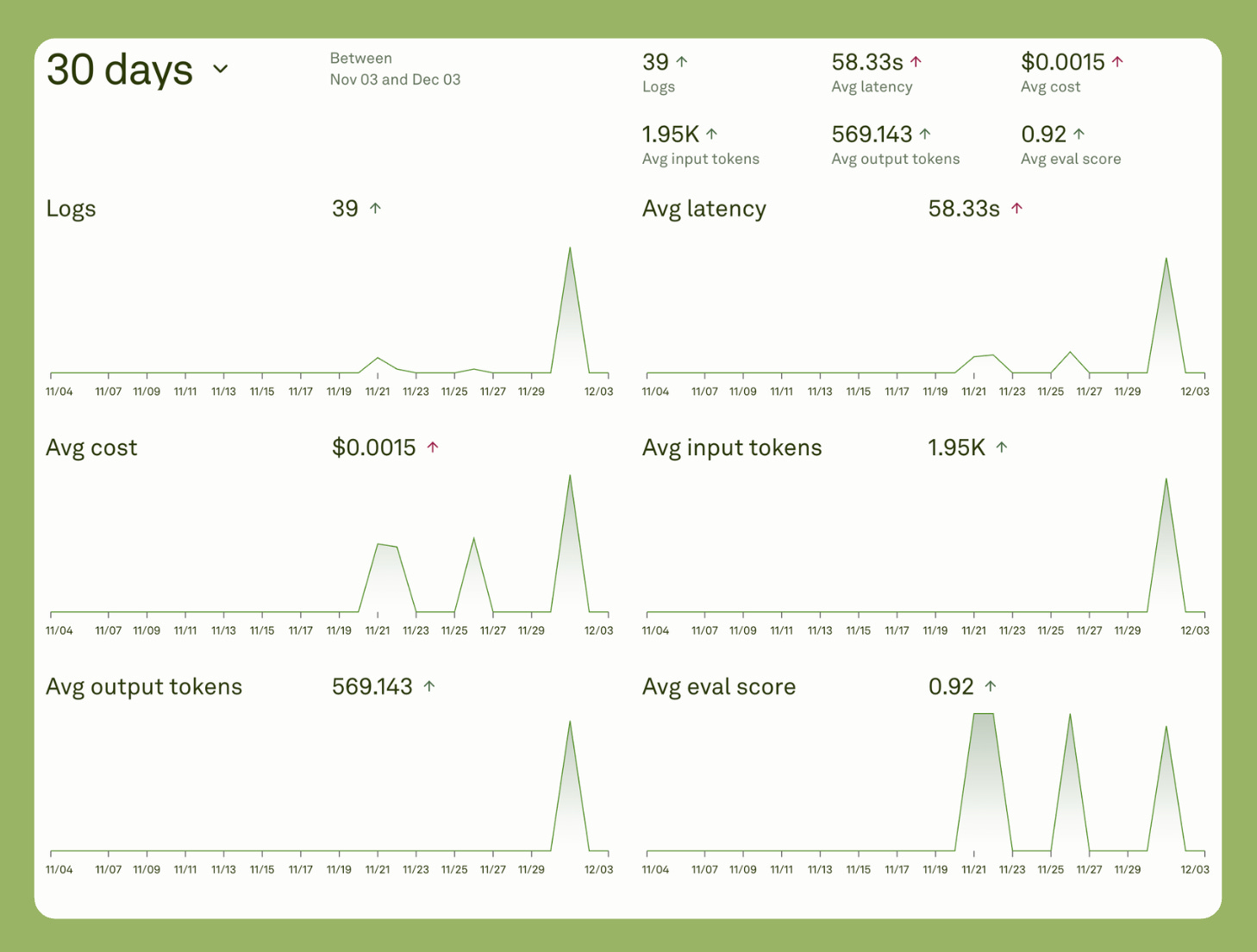
Another important feature of the observability layer is that it automatically tracks tokens and cost per operation. This visibility is crucial for optimization.
Here’s what the performance dashboard shows over 30 days:
Key metrics visible:
39 logs with 58.33s average latency.
$0.0015 average cost per request.
1.95K average input tokens, 569K average output tokens.
0.92 average evaluation score.
But there’s another critical feature called the continuous evaluation. Essentially, every time the app executes, the response gets evaluated based on selected evaluators. This enables you to:
Check which query types break the model
Track average response length
Monitor token consumption patterns
Identify cost anomalies
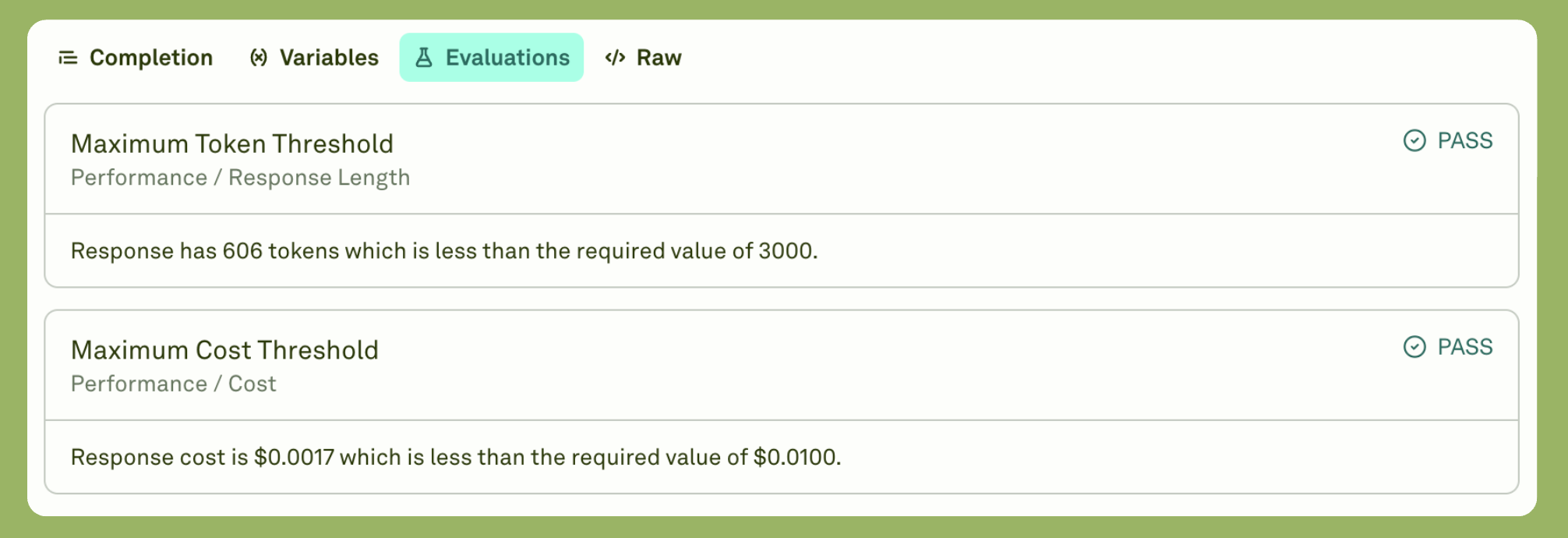
You can see from the screenshot above, I set up evaluators for:
Maximum Token Threshold: Response contains 606 tokens, which must be less than the required 3000.
Maximum Cost Threshold: Response cost is $0.0017 less than the required $0.0100.
In the case that the evaluation passed. For me, this means I can rest assured that there isn’t any unnecessary cost spike and token usage.
The idea with continuous evaluation is to carry the same evaluation methods from iteration to deployment and monitor them closely.
Conclusion
Building agentic RAG systems is not about adding complexity. It’s about adding intelligence.
Traditional RAG retrieves in a single logical flow. Not blindly, but as a compulsion. Agentic RAG decides first, then acts. This decision-making layer transforms a rigid pipeline into an adaptive system that understands context, coordinates tools, and optimizes for cost and performance.
The architecture patterns we explored solve real production challenges:
Query routing saves 40% on costs by skipping unnecessary retrievals. It reduces latency by 35% through intelligent intent classification.
Tool orchestration handles failures effectively. When one component breaks, the system continues. It provides fallback data instead of error messages.
Using the right abstractions makes this possible. A unified gateway abstracts providers. One interface works across multiple providers. Switch models with one line. Implement fallbacks automatically.
The observability platform shows everything. Which operations cost the most? Where are the bottlenecks? What queries trigger RAG? You see it all in hierarchical traces.
Start simple. Add intent classification first. Then add tools. Monitor everything with proper observability. The best practice is to optimize based on data.
In the end, users won’t notice the architecture. They’ll notice the speed. They’ll notice the accuracy. They’ll notice it works.
That’s production-ready agentic RAG.
This piece really made me think about intelligent decision-making. It's like in Pilates, where each movement requires a understanding of intent and adaptation. Agentic RAG's precision is truly impressive.
The gateway abstraction is such a practical approach for managing multiple providers while keeping your codebase clean. When you standardize that interface layer, switching between models or providers for cost reasons becomes way less painful than hardcoding everything. Plus the observability piece at the gateway level gives you real data to actually optimize instead of just guessing which model to use for which query.